Home Blog Page 18

Bigg Boss OTT – FAQ, Contestant List, Salaries & Age

0

We have seen a good mix of masala and exciting content in Bigg Boss OTT also known as Bigg Boss: Over-The-Top (the controversial Indian reality TV show). It premiered on 8 August 2021 on Voot and Voot Select with Karan Johar as the host of this digital-only season. Let’s check out some details about the show below in the post…

Bigg Boss OTT :-

Presented by: Karan Johar
No. of days: 42
No. of housemates: 13
Country of origin: India
No. of episodes: 33
Original network: Voot
Original release: 8 August 2021 – present
Streaming: It will stream for six weeks
Previous Season: Bigg Boss Season 14
Next Season: Bigg Boss Season 15

Bigg Boss OTT – FAQ

1. Who is hosting the Show?

Karan Johar will be hosting the show.

2. Who is the highest-paid celebrity?

As per the sources, Ridhima Pandit is the highest-paid celebrity.

Also Visit: Bigg Boss 10 participant Swami Om passed away

3. Highest-payment?

Ridhima’s payment for every episode is 5 Lakhs, which is the highest among all contestants.

4. What Others are getting?

Others are in the range of 2-3 lakhs, only Ridhima is the one getting paid so high.

5. Name of the Bigg Boss OTT Contestant?

There are 6 boys & 7 girls, Ridhima Pandit, Karan Nath, Neha Bhasin, Urfi Javed, Divya Agarwal, Anusha Dandekar, Pratik Sehajpal, Akshara Singh, Neha Malik, Pavithra Lakshmi, Nishant Bhat and Zeeshan Ali are the contestants in the house.

Also Visit: Broken But Beautiful 3 – Review: Sidharth Shukla & Sonia Rathee Web Series

5.1 Bigg Boss OTT Contestants and their Job Role?

Name of the contestantJob & Known for
Ridhima PanditIndian actress and model
Known for: Bahu Hamari Rajni Kant, Fear Factor: Khatron Ke Khiladi 9
Shamita ShettyIndian Bollywood actress and interior designer
Known for: Mohabbatein, Bigg Boss 3, Jhalak Dikhhla Jaa 8 and Fear Factor: Khatron Ke Khiladi 9
Urfi JavedIndian television actress
Known for: Bade Bhaiyya Ki Dulhania, Meri Durga Bepannaah and Puncch Beat Season 2
Zeeshan KhanTelevision Actor and YouTuber
Known for: ZSQUAD VLOGS
Divya AgarwalIndian television actress, model, and dancer
Known for: participation in MTV Splitsvilla season 10, winning the MTV Ace of Space season 1, Ragini MMS: Returns. Hosted or supported shows including Roadies: Real Heroes, MTV Ace the Quarantine.
Neha Bhasin Indian singer and songwriter.
Known For: playback work in Bollywood, Tollywood, Kollywood
Milind GabaSinger
Known For: Nazar Lag Jayegi, She Don’t Know, Yaar Mod Do
Akshara SinghIndian actress, Singer, Dancer, Television presenter
Known For: Tabadala, Sarkar Raj and Satya, highest-paid actresses in Bhojpuri cinema
Karan NathFilm actor
Known For: Yeh Dil Aashiqanaa
Muskaan JattanaSocial Activist
Known For: videos on women’s rights
Nishant BhattChoreographer
Known For: Super Dancer, Jhalak Dikhhla Jaa, Dance Deewane
Raqesh BapatIndian actor and model.
Known for: Tum Bin, Vrundavan, Savita Damodar Paranjape, Saat Phere: Saloni Ka Safar, Maryada: Lekin Kab Tak? and Qubool Hai.
Pratik SehajpalReality television star and Model
Known For: MTV Love School, Ace of Space 1

Also Visit: Bigg Boss 14 Winner: Google Announces Rubina Dilaik as Winner!

6. What’s new in this season?

In this season, some new innovations are being made available for the Bigg Boss audience such as Nominations, Punishments & Report Card.

7. What’s Amazing about this season?

The first time ever in the history of Bigg Boss, the season launched 6 weeks before the TV version on an OTT platform Voot.

8. What is the theme of this season?

This season is based on the “Stay Connected” theme. There are 6 boys & 7 girls who have to struggle on making the relationship or you can say bond with their connection stronger and survive in the game.

Also Visit: Battlegrounds Mobile India launch: Check full list of smartphones that will not support new game

Current status of Housemates:

HousematesDay enteredDay exitedStatus
DivyaDay 1Nominated
MuskanDay 1Nominated
NehaDay 1Nominated
NishantDay 1
PratikDay 1Nominated
RaqeshDay 1
ShamitaDay 1Nominated
AksharaDay 1Day 29Evicted
MillindDay 1Day 29Evicted
NiaDay 25Day 26Guest
ZeeshanDay 1Day 18Ejected
RidhimaDay 1Day 15Evicted
KaranDay 1Day 15Evicted
UrfiDay 1Day 8Evicted


Also Visit: Bigg Boss 14 winner: Rubina Dilaik lifts the trophy and prize money of Rs 36 lakh

Also, check the complete list of all the Bigg Boss OTT Contestants with Salary or Fees they are Charging…

Bigg Boss OTT Contestant List and Salaries

Name of the contestantSalary Per Week
Ridhima Pandit5 Lakhs
Shamita Shetty3.75 Lakhs
Urfi Javed2.75 Lakhs
Zeeshan Khan2.5 Lakhs
Divya Agarwal2 Lakhs
Neha Bhasin2 Lakhs
Milind Gaba1.75 Lakhs
Akshara Singh1.75 Lakhs
Karan Nath1.5 Lakhs
Muskaan Jattana1.5 Lakhs
Nishant Bhatt1.2 Lakhs
Raqesh Bapat1.2 Lakhs
Pratik Sehajpal1 Lakh

Also Visit: Bigg Boss 15 audition | How can you participate?

Bigg Boss 15 OTT Contestants & Age

  1. Neha Bhasin.
  2. Karan Nath, whose age is 38.
  3. Zeeshan Khan (30 years old).
  4. Ridhima Pandit (31 years old).
  5. Akshara Singh (27 years old).
  6. Raqesh Bapat also known as Rakesh Vashisht (42 years old).
  7. Urfi Javed (24 years old).
  8. Nishant Bhat.
  9. Muskaan Jattana.
  10. Divya Agarwal.
  11. Pratik Sehajpal (28 years old).
  12. Milind Gaba (30 years old).
  13. Shamita Shetty.


More on TheFlashUpdate

Bachpan ka Pyaar Video Out featuring 10-year old internet sensation Sahdev Dirdo

0

Finally, Bachpan ka Pyaar Video is Out now. The video has featured a 10-year old internet sensation Sahdev Dirdo. Everyone is well aware of the ‘Bachpan Ka Pyaar Boy Sahdev Dirdo’, the fame boy singing the song in the viral video. 

Sahdev who sang the song in the viral video in his school sang it casually, but all thanks to the memes and IG reels. After the video was uploaded, he became an overnight celebrity.


View this post on Instagram


A post shared by PATNA in HD (@patnahd)

As he gained fame, people came forward to recognize him more.

Also Visit: How to Get Windows 11 On PC? Right Now!

Whether that’s stars or politicians, everyone seems super excited to meet him. The Chattisgarh kid has also been receiving some cool opportunities and moments.

The Chattisgarh Chief Minister congratulated him for all his viral video with flower garlands, whereas Rapper Badshah made a few reels on Sahdev’s song. Additionally, he was also invited as a guest on Indian Idol.

However, now MG Motors, also known as Morris Garages, honoured Sahdev for his viral song and awarded a check of Rs 21,000 as per news published on India.com

Bachpan ka Pyaar Official Video

Badshah along with Aastha Gill has collaborated with the Sahdev Dirdo for a full music video. The video got out to watch and it is available on YouTube. The new full music video features Sahdev along with Rapper Badshah, singer Aastha Gill and musician Rico.

More On TheFlashUpdate

Sad News: Young Film and television actress Saranya Sasi dies at 35

0

BREAKING: The 35-year-old serial actress breathed her last in Trivandrum. Young Film and television actress Saranya Sasi dies at 35…

Young Film and television actress Saranya Sasi passed away on Monday. She was admitted to a private hospital.

For the past 10 years, Sasi had undergone 11+ major surgeries and was somewhat recovering from a rare form of brain tumour she was battling for a long time. 

Young Film and television actress Saranya Sasi dies at 35

Her condition worsened after she was recently diagnosed with Covid-19 and pneumonia together.

After a complete recovery from COVID, she suffered additional health problems that were due to low sodium levels in her blood.

In 2012, when Saranya was diagnosed with cancer, she received the help of many personalities from the industry. The actress was facing a severe financial crisis.

One of the known supporters was her industry friend Seem G Nair. Seem G had been financially and mentally supporting her for a long time.

Additional Information About Saranya Sasi

Full Real Name: Saranya Sasi.
Date of Birth: 15 March 1986.
Date of Death: 09 August 2021.
Age (at the time of death): 35 years old.
Place of Birth: Pazhayangadi, Kannur, Kerala, India.
Place of Death: Private Hospital in Trivandrum, Kerala, India.
Cause of Death: Cancer
Profession: Actress, YouTuber & television star.

She joined the film industry with ‘Chacko Randaman‘. Saranya had presented notable roles in films such as Chotta Mumbai, Thalappavu, Bombay and many other films.

She has performed in many TV serials. Her roles in serials like Manthrakodi, Harichandanam, Seetha were famous among the Television Audience.

More on TheFlashUpdate

5 Strong tips to protect your phone from Pegasus spyware

0

The growing number of spyware attacks is easily observable these days, here are the 5 Strong tips to protect your phone from Pegasus spyware.

The world is talking about spyware, you may also have heard about it.

Yes, I am talking about Pegasus spyware. It has reportedly attacked hundreds of mobile devices of leading personalities over the last few years. 

Pegasus spyware

Pegasus is said to be one of the most intricate spyware that is remarkably expensive and cannot be afforded by a civilian. As per the details, we have collected yet, the Pegasus spyware is chiefly used to attack mobile devices of notable personalities who know of some secret-like information.

So, there are great chances that your mobile device is not affected by the dangerous Pegasus spyware. But that doesn’t mean you shouldn’t protect your device. There are various other spyware available and can infect your mobile device. Beware! 

Also Visit: What is GB WhatsApp? Should you use it or not?

The growing number of spyware attacks is easily observable these days, here we have listed out 5 Strong tips to protect your phone from Pegasus spyware.

Protect Yourself from Pegasus Spyware

Use Antivirus

Use Antivirus
Use Antivirus

There are several applications available on mobile devices as Antivirus. These apps can be quickly downloadable from the Google Play Store as well as from the Apple App Store. These antivirus solutions are developed to prevent spammers/hackers from placing dangerous spyware like pegasus on your mobile device. 

Note: An antivirus solution can’t completely defend your device from being affected, so users must be mindful of dubious links, calls and messages.

Also Visit: How to Get Windows 11 On PC? Right Now!

Change passwords Frequently

Change passwords Frequently
Researchers advise changing passwords on a monthly basis

Researchers advise changing passwords for cloud services and frequently used applications on a monthly basis. If not changed, it makes it simple for scammers to attack your phone.

Strong passwords are necessary

Strong passwords are necessary
Strong passwords are necessary. It is a compulsory step.

Setting up a strong password is a compulsory step to follow at any cost. it is required to maintain your personal data protected from hackers. Safety Researchers suggest not use names, alias, phone number, date of birth, or any such details as passwords. It is recommended that passwords should include a mix of alphabets, numbers, special characters and more so that no scammer can ever guess it.

Also Visit: How to Boost battery life of Android smartphone?

Use a Mobile device with secure hardware

Use a Mobile device with secure hardware

Safety Researchers also advise using an expensive mobile device with secure hardware. Some of the premium mobile devices from brands like Samsung, Apple among others provide secure hardware that can block attacks or spyware like Pegasus.

Never install random apps

Never install random apps
Never install random apps, only download the Applications that are safe and developed by a reliable/verified developer.

Security researchers warn users to not download any random or unnecessary app on their device. Normally, smartphone users have a general tendency to download and install random apps from the Google Play store, which often can be used as a way used by hackers to cheat and to steal their data and money. So, only download the Applications that are safe and developed by a reliable/verified developer.

More From TheFlashUpdate

Get free Netflix subscription by just following these steps

Ways to Find out who blocked you on WhatsApp – Tips & Tricks

You can now Erase the Last 15 Minutes of Search History on Google

How to Auto Erase OTP Messages from Inbox?

UP Population Control Bill 2021: No Government Jobs, Subsidy If More Than 2 Children – 2-child norm

Get free Netflix subscription by just following these steps

Netflix subscription plans in India, are starting at Rs 199 and going up to Rs 799. But for those who wish to buy a Netflix plan without any fee or want a free subscription, here we have a guide — How to get free Netflix subscription?

Firstly you should know what are you going to get for free. What is the exact fee or subscription plan that you will get without any charges? 

In India, Netflix is offering four subscription plans starting at Rs 199 and going up to Rs 799. Under Netflix Rs 199 mobile plan you will get access to 2 screens, where content will play at a video resolution of 480 pixels. And Rs 499, Rs 649, and Rs 799 are some other plans with extra benefits on Netflix.

Under Rs 499 basic Netflix plan:

  • Plan offers good video quality
  • Content plays at 480p resolution
  • Four devices support (including phone, tablet, computer and TV)

The third plan worth Rs 649:

  • Offers support for “better” video quality
  • Content plays at the resolution of 1080pixels
  • Four devices support (including phone, tablet, computer and TV)

The fourth Netflix plan worth Rs 799:

  • Offers best video quality
  • Content plays at 4K+HDR resolution
  • Four devices support (including phone, tablet, computer and TV)

What to do to subscribe to a membership?

To subscribe, simply go to the Official website of Netflix and acquire a desired plan that best suits you and your budget. 

Payment options: You can buy any Netflix subscription plan with UPI, credit or debit card, Paytm or any other online purchasing process.

Also Visit: How to Boost battery life of Android smartphone?

How to Get a free Netflix subscription?

Still curious about the trick to get a free Netflix subscription plan? Okay, let me reveal it for you…

If you do not want to purchase a Netflix subscription and wish to get a free subscription plan, there are several approaches to get that as well. Operators like Reliance Jio are currently offering a free Netflix subscription to users.

JioFiber plans with free Netflix

Rs 1499 JioFiber plan:

  • Offers free Netflix (Basic), Amazon Prime Video + 13 more OTT Apps
  • Unlimited data with 300 Mbps Upload & 300 Mbps Download speed
  • Unlimited calls
  • Pack validity: 30 days
  • Data: 3300 GB

Rs 2499 JioFiber plan:

  • Offers free Netflix (Standard), Amazon Prime Video + 13 more OTT Apps
  • Unlimited data with 500 Mbps Upload & 500 Mbps Download speed
  • Unlimited calls
  • Pack validity: 30 days
  • Data: 3300 GB

Also Visit: How to Get Windows 11 On PC? Right Now!

Rs 3999 JioFiber plan:

  • Offers free Netflix (Standard), Amazon Prime Video + 13 more OTT Apps
  • Unlimited data with 1 Gbps Upload & 1 Gbps Download speed
  • Unlimited calls
  • Pack validity: 30 days
  • Data: 3300 GB

Rs 8499 JioFiber plan:

  • Offers free Netflix (Premium), Amazon Prime Video + 13 more OTT Apps
  • Unlimited data with 1 Gbps Upload & 1 Gbps Download speed
  • Unlimited calls
  • Pack validity: 30 days
  • Data: 6600 GB

How to get a free JioFiber connection?

To get a free JioFiber connection, simply head over to the Official website of JioFiber or the My Jio app. And to recharge your existing JioFiber number, you can use any application like Paytm, PhonePe, Google Pay, or just head over to Jio.com.

More on TheFlashUpdate

Ways to Find out who blocked you on WhatsApp – Tips & Tricks

You can now Erase the Last 15 Minutes of Search History on Google

What is GB WhatsApp? Should you use it or not?

How to Auto Erase OTP Messages from Inbox?

UP Population Control Bill 2021: No Government Jobs, Subsidy If More Than 2 Children – 2-child norm

Ways to Find out who blocked you on WhatsApp – Tips & Tricks

Ways to Find out who blocked you on WhatsApp: Here we are going to reveal some tips and tricks that the Facebook-owned messaging platform has mentioned on WhatsApp’s FAQ page for users to exactly find out if someone blocked them on WhatsApp. Let’s take a quick look at the tips and tricks to find who blocked you on WhatsApp.

Do you think your contact has blocked you on WhatsApp? Well, to be very clear and straight, there is no official tool available for public use that will let you find a contact who blocked you on WhatsApp. But, here are a few tricks to check out – who blocked you on WhatsApp?

WhatsApp has unveiled some ways for users to check out if someone blocked them on their platform. These methods are officially listed on WhatsApp’s FAQ page. Check out them here…

Also Visit: Malika’s Diamond ring gave a hint of engagement with Arjun Kapoor

Ways to Find out who blocked you on WhatsApp

To find if a contact blocked you on WhatsApp, the messaging platform suggests the following ways:

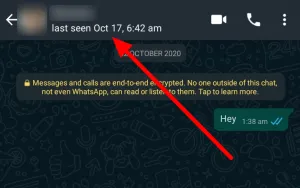
 #1: Check the last seen first

Check the last seen
Check the last seen

When you get blocked by a contact on WhatsApp. You won’t be able to view the last seen of the WA Account you suspect has blocked you.

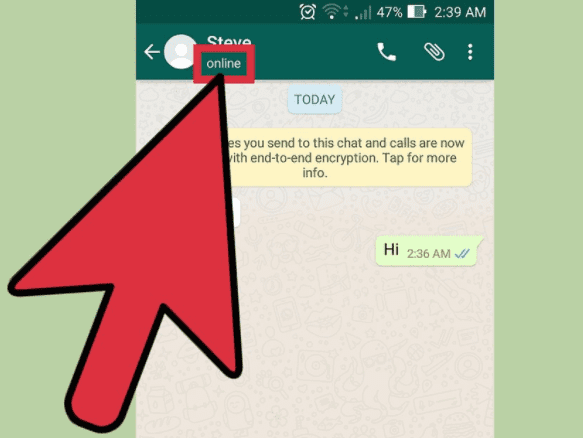
#2: Check the online status

Check the online status
Check the online status 

Checking the contact’s online status should be your next step. If a contact blocked you, his/her online status will not be visible to you even when he/she is online.

Also Visit: Avoiding Mask & social distancing after Vaccination – Is it safe?

#3: Check the profile photo

Check the profile photo

 Checking the profile photo can also help you in this situation. If you cannot view the profile picture of a user, then there are chances that you are blocked.

Other cases when you cannot view the profile picture of a user;

  • When the contact has deleted your phone number 
  • When the contact has deleted his/her display photo.
  • When the contact has disabled the public appearance of his/her profile photo.

Also Visit: How to register on the Co-WIN portal? COVID Vaccine Registration

#4: Check By Calling via the app

Check By Calling via the app

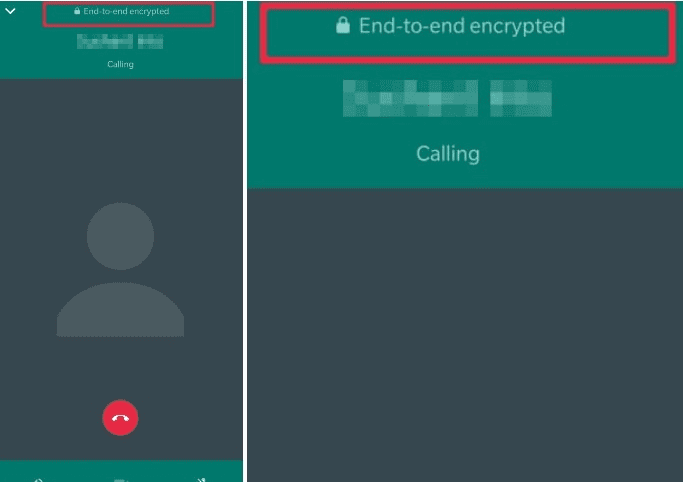
If you doubt that someone has blocked you, then try calling via the app. The call will not go through, in case you are blocked. This way will confirm whether you are blocked by someone on the messaging platform.

#5: Try creating a group

Try creating a group

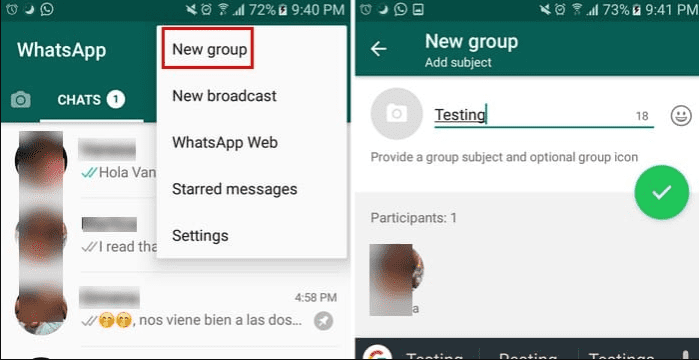
If someone has blocked you, you won’t be able to add him/her to a group. So, that will confirm whether you are blocked by a contact on the messaging platform.

Also Visit: The Batman Release Date, Cast, Trailer & More

#6: Try sending a message

Try sending a message

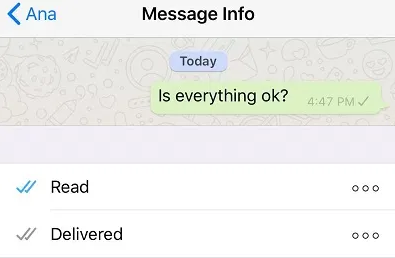
If your message is not getting delivered to someone’s WhatsApp account, chances are you are blocked.

If you observe all of these signs of getting blocked for a contact, this could mean that the user has blocked you. However, there are other possibilities. WhatsApp intentionally restricted users to directly check who has blocked them in order to protect your privacy when you block someone. Thus, WhatsApp cannot feature a tool to check whether you are being blocked by someone or not.

More On TheFlashUpdate

Daily Water Intake for adults in India

Battlegrounds Mobile India launch: Check full list of smartphones that will not support new game

Facebook New Feature: Additional Opportunities to Communicate with Customers

What is White Fungus? Headache to India’s Healthcare System

The Falcon and The Winter Soldier Season 2 Release Date, Plot, Cast, and more


You can now Erase the Last 15 Minutes of Search History on Google

0

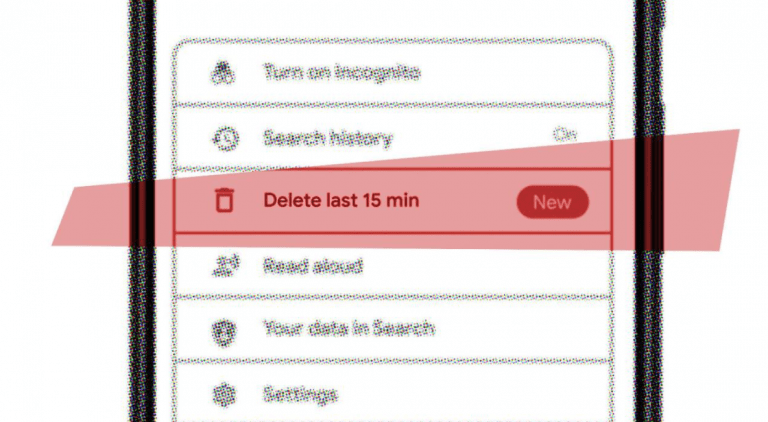
At the Google I/O 2021 event back in May, Google made several announcements and one of them was about deleting search history for a shorter period. Let me tell you what it means… Now, Google users can delete or erase the last 15 minutes of their google search history by clicking a button in the Google app.

The feature is currently available in Google’s iOS app. So, here’s how you can delete the Last 15 Minutes of Search History on Google.

Erase the Last 15 Minutes of Search History on Google

If talking about the features that people are already familiar with, Google users can erase 24 hours to all-time search history. Apart from all this, one can also opt for “auto-erase search history” after 3, 18, or 36 months options.

But now Google has changed things, if you want, you can erase the last 15 minutes of search history also. If someone asks for your device and you don’t want to tell him/her about your recent search activities. Then you can quickly delete your recent search history with this option.

I think erasing the last 15-minute history is the best option from google that is helping us to enhance our privacy to the next level.

What you think about this new announcement, feel free to share in the comment box.

If you are an android user, then sorry, you have to wait for some more time, because it is not available for android users yet.

Here’s how you can enable it on your iPhone:

1. Update Google App

2. Open updated Google App

3. Locate your profile picture icon

4. Tap on your profile picture icon

5. Pop-up menu appears. You will now see a new option to erase the last 15 min under Search history, just tap on it.

That’s it guys, your last 15 min of search activity will be erased in just a tap.

This is how you can erase the Last 15 Minutes of Search History on Google from your device. As stated above, this is currently possible only on iOS and we don’t know when Google will roll this feature out for Android. But it is sure that it will also come on Android very soon.

Enjoyed Google tips and tricks, stay tuned!

More On TheFlashUpdate

UP Population Control Bill 2021: No Government Jobs, Subsidy If More Than 2 Children – 2-child norm

How to Boost battery life of Android smartphone?

Lambda variant: New Covid variant detected...

Poonam Pandey’s new music video with baby sharks

Best food in Covid-19 to boost immune system

How to Auto Erase OTP Messages from Inbox?

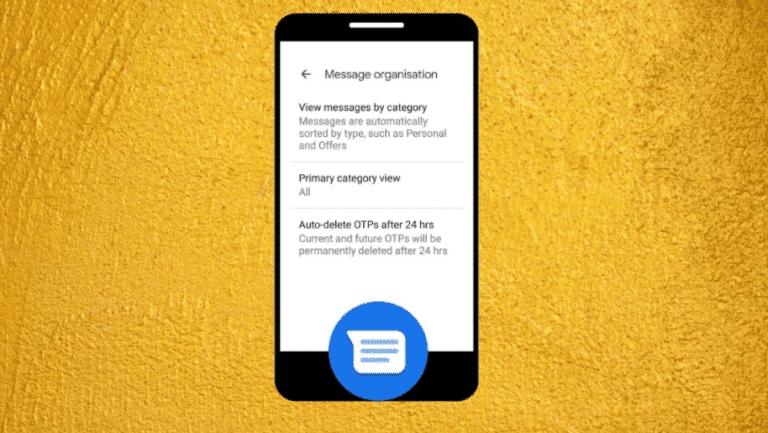
Google has launched an innovative feature in its Messages apps that will automatically erase OTP messages from your message inbox. Also, Google has started rolling out the feature, in which Google will let you Auto Delete OTP Messages from Inbox after 24 hours. Here, I am going to describe, How to Auto Erase OTP Messages from Inbox?

Auto Erase OTP Messages from Inbox

To enable this feature, follow the steps given below:

Here’s how!

1. Update your Google Messages app from the Play Store. Or make sure you are running its latest version.

2. Open it.

3. Tap on Three vertical dots, near the search box ( top right corner ).

4. Select Settings from the menu

5.Tap on “Message Organization”.

6. Now you will see a toggle next to the “View messages by category” option, enable it.

7. At last, you will be able to switch the toggle on for the “Auto-delete OTPs after 24 hrs” option.

That’s it, guys. Now, every OTP message will be automatically erased after 24 hours from your message’s app inbox.

You can also pick what should be your “primary category view” in your inbox. Use the above-mentioned steps, you will find the “primary category view” option just above the “Auto-delete OTPs after 24 hrs” option.

So, guys, this was all about How to Auto Erase OTP Messages from Inbox on an Android phone? The feature is available only on Google’s Messages app. So, if you are not using it, make sure to download it today, you can download it from Google Play Store.

More on TheFlashUpdate

Daily Water Intake for adults in India

Battlegrounds Mobile India launch: Check full list of smartphones that will not support new game

Facebook New Feature: Additional Opportunities to Communicate with Customers.

Domino’s & Air India Data Breached! | How to secure your data?

What is White Fungus? Headache to India’s Healthcare System


UP Population Control Bill 2021: No Government Jobs, Subsidy If More Than 2 Children – 2-child norm

0

UP Population Control Bill 2021: Says No Government Jobs, Subsidy If More Than 2 Children. A compulsory subject related to population control in all secondary schools may be the next step.

KEY HIGHLIGHTS:

  • The news Population Control Act would be called the Uttar Pradesh population (Control, stabilization and Welfare) Act, 2021
  • Rebates on utilities such as electricity, house tax, water for couples who follow the 2-child norm
  • 3% increase in the employer‘s contribution Fund under NPS

Lucknow: According to UP Population Control Bill 2021, anyone violating 2-child policy in U.P. will be restricted from applying for government jobs, getting promotions in government jobs, contesting local bodies elections, and receiving any kind of government subsidy.

Also Visit: How to Get Windows 11 On PC? Right Now!

UPSLC – The Uttar Pradesh State Law Commission states,

the provisions are part of the draft titled:↓

The Uttar Pradesh Population (Control, Stabilization and Welfare) Bill, 2021

The UPSLC website says,

“The State Law Commission, UP is working on control, stabilisation and welfare of the population of the state and has prepared a draft bill.”

Also Visit: How to Boost battery life of Android smartphone?

According to reports, suggestions have been requested from the citizens to enhance the draft bill 2021. July 19 is the last date for it.

Listing incentives for a government employee who adopt the 2-child norm, the draft bill 2021 says,

“Public servants who adopt the two-child norm will get two additional increments during the entire service, maternity or as the case may be, paternity leave of 12 months, with full salary and allowances and three per cent increase in the employer’s contribution fund under national pension scheme.”

For the purpose of implementation of the act, a new State Population Fund will be constituted soon.

Also Visit: What is GB WhatsApp? Should you use it or not?

The draft bill also says that the maternity centres and NGOs will distribute contraceptive pills, condoms, etc, and the government will ensure the establishment of new maternity centres at all primary health centres. Spreading awareness about methods of family planning will be one of the next aims that the government is going to seriously focus upon.

From now, the community health workers will help the government in implementing the act. The centres will ensure, mandatory registration of pregnancies, births, deliveries and deaths across the state.

The draft bill also states that it shall be the responsibility of the Govt. to include a compulsory subject relating to population control in the courses of all secondary schools.

UP Population Control Bill 2021

The UP Population Control Bill 2021 seeks to revitalise efforts and provide for measures to control, stabilise the population of the state by implementing the new act and promoting the 2-child norm.

Also Visit: How to Boost battery life of Android smartphone?

According to news agency PTI, the draft bill reads,

“In Uttar Pradesh, there are the limited ecological and economic resources at hand. It is necessary and urgent that the provision of basic necessities of human life including affordable food, safe drinking water, decent housing, access to quality education, economic/livelihood opportunities, power/electricity for domestic consumption, and a secure living is accessible to all citizens.”

For the betterment of sustainable development with more fair distribution, it is necessary to control and stabilise the population of the state, it says.

More on TheFlashUpdate

Delta Plus Variant in Maharashtra: Variant of Concern

What is White Fungus? Headache to India’s Healthcare System

Litecoin Price Prediction 2025 | Right Time To Invest?

Find vaccination centre using WhatsApp in India

Akshay Kumar is Kriti Sanon’s photographer for this click

How to Boost battery life of Android smartphone?

Hello Visitor, today here we are going to reveal 5 useful tips to boost battery life of your Android smartphone.

Experiencing poor battery life! But aren’t ready to upgrade your Android smartphone yet, check out these five basic tips from our how-to guide.

Here is how to boost battery power on smartphones:

1) Control your screen brightness

One of the most basic tips that will boost your daily battery life is “Take control of your screen brightness“. Yes, the biggest culprit responsible for the quick battery drainage on Android phones is the screen.

We recommend you set the brightness to change automatically. The auto-brightness mode on Android Pie (9.0) and above keep the brightness a little lower to save your battery.

Also Visit: How to Get Windows 11 On PC? Right Now!

2) Turn on battery optimization

The next thing you should do to extend your battery life is to ensure that Adaptive Battery or Battery Optimisation is turned on. This is used to block all battery-intensive tasks running in the background. All thanks to Google, ever since Android Marshmallow (6.0) the company has been figuring techniques for android users to make their better control over battery life.

3) Reduce your screen timeout to Boost battery life of Android smartphone

In general, smartphones are set to turn off screen after one or two minutes. Do you know? Reducing your screen timeout to 30 seconds will definitely help you to save more battery.

Tip to save additional battery life: Restrict apps with high battery usage from running in the background.

Also Visit: Battlegrounds Mobile India launch: Check full list of smartphones that will not support new game

4) Disable auto-sync for unused accounts from your smartphone

Multiple accounts on smartphones can quickly drain a lot of battery life as each account syncs data automatically from the internet, including, photos, email, contacts and more. Disabling auto-sync for unused accounts will help to increase your battery power. As an alternative, you can also delete these accounts if you feel that you have not used any of them for a long time.

5) Stop using battery saver apps

Stay away from bogus apps that promise a ‘snake oil’ solution, they don’t actually save any battery life. Many of these apps kills all your background apps and says that your “Battery life is extended”. But the truth is, all those applications will simply get woken up again and will use even more power in the process.

More on TheFlashUpdate

Upstox Vs Zerodha | Quick Overview with the help of Tables

Lambda variant: New Covid variant detected

Easy Evening Snacks without onion and garlic

Why Cryptocurrency Is Going Down?

Koo App Features | Indian Alternative to Twitter