To be more agile and efficient when managing our emails in Gmail, we can use filters. They are easy to apply and very useful. Let’s learn about all the options to filter and search emails in Gmail.
If you learn to use these filters, you will surely save a lot of time on searches and you will know how to find just that message you need in the blink of an eye. Today we want to help you find and learn how to use all the options to filter and search emails in Gmail. Let’s go there!
USE THE SEARCH ENGINE WITH KEYWORDS
It is one of the tools that you have most at your fingertips. You don’t have to search for this option, because it’s right up there at the top of your inbox. In the Search mailbox, you can enter the keywords you want. This option is the easiest to use.
It will come in handy if what you want is to find a message that you know contains very specific keywords. For example January gas bill. By clicking on the search button, the email or emails you are looking for will quickly appear. As you can see it is quite simple.
TAKE ADVANTAGE OF THE SEARCH ENGINE FILTERS
But did you know that you have more options to search and find the emails you need? Gmail includes a good number of filters in its search engine with which you can refine the search. And it is that sometimes we need to reach a higher level of precision when locating messages.
If you want to learn how to activate these filters, we recommend you follow these instructions:
1. Access the Gmail tray and at the top, in the search box, click on the arrow that looks down. You will see that the different search options are displayed immediately.
2. From here, you will have the option to filter according to different criteria. You can count on the following:
From: A good option to filter based on the sender. If you are sure that you are looking for messages from someone in particular, here you can indicate their first name or directly their email address. As soon as you write the first initial you will get a list with different proposals (probably those of the most recent or common contacts).
To: If you want to find the messages you sent to a specific person or contact, with this filter you have it very easy. Just enter the name or address and all the emails you have sent will appear in chronological order.
Subject: Do you remember the specific subject of a message? It may be easy for you to search for keywords in the subject, so you can use this filter. You will then have a list of proposals.
Contains the words: Sometimes it is very easy for us to search for keywords. Imagine that you are looking for all the corresponding invoices in light of the last six months. It will be enough for you to write, for example, the name of the company together with the word invoice. Surely you will soon find the emails you are looking for.
Does not contain: You have another option that is just the antagonist of the previous one and that will also come in handy to use it in combination or simply to find all the emails that do not contain a certain word. It is a good way to exclude everything that does not interest you, especially if you are one of those who have an overflowing inbox.
Size: You will recognize them by their weight. There are emails that weigh a lot because they contain very valuable documents. If you know that the email you are looking for is worth its weight in gold, perhaps you should use these search criteria. It will come in handy to differentiate the messages that contain important information from those that only consist of text.
Date range: It is a very good option – or better said, filter – to search for emails sent or received during a certain period. It is very useful to find, for example, those emails that have been sent or received during the last month, the last quarter or the last year. If you combine it with other search criteria, you will soon find the collection of emails you are looking for.
Find: Another filter that you have the option of using combined with other criteria is the Search filter. And it is that here the system allows you to select between different folders or labels. You can also choose if you only want it to search your Inbox, Starred, Sent, Drafts, Chats, Spam, or Trash.
Contains attachments: You can also differentiate between emails that include attachments and those that don’t. If you know that someone regularly sends you messages with attached content and you need to search for one of these documents, you can check that box. In this way, you will get faster access to what you want.
Do not include chats: Finally, you should know that in these searches, Gmail also considers the conversations that we have through Hangouts. In this way, conversations may appear in the search results that have no relevance to us or that simply make your work more complicated. Check this box to prevent conversations or chats from appearing in search results.
All in all, you will see how easy it is to find the emails you are looking for through the filters.
Let the battery discharge completely before charging the phone, put the phone in aeroplane mode so that it charges faster, if you connect it to a public charger they can steal your data… There are many tips the public give us on how to charge mobiles. However, how many are true? Here, we will discuss 10 myths about charging your mobile battery that you should stop believing.
Manufacturers usually add to the instructions that the first few times it is better to discharge the entire battery so that it works better in the future, but, beyond that, they do not give good practices on the use of batteries, everything we know comes from somewhere. The advice they give us or what we already knew from before.
In this article, we are going to list 10 myths about charging batteries that do not affect our device, and some even make it worse.
10 myths about charging your mobile battery
1. Leaving the phone charging at night is bad
This habit that a good number of users have does not harm the phone. When the mobile is charged, it stops collecting the electricity that comes from the charger.
Smartphones only turn the phone back on when they judge that it has been used up enough to need recharging, so this myth is debunked. You can leave the phone plugged in and sleep peacefully.
2. The phone works the same in Power saving mode
If you are wondering how much Power Saving Mode can affect your phone. The truth is that it is useful for the battery to last longer, but it affects its use.
In the event that you need to know what is happening at all times or that notifications skip you, with Power saving mode the times are lengthened and the system makes longer intervals between one search for news and another, so you may receive more late messages or emails.
3. Public charging sites are safe
Yes and no. The charging points in the subways, for example, are usually safe and you can plug in your phone without any problem. But if someone with bad intentions put a similar one and you plugged in your mobile, they could access your information.
When you are thinking of plugging your phone into a public charging point, make sure it is the real one and think about whether the organization or company is trustworthy.
4. Fully charge the battery of your new phone
This recommendation does not affect the quality of the battery in the long term. It is usually done for a more… commercial reason.
When you charge the entire battery, it will last longer and you will have the impression that the phone is better and the battery of quality, you will be satisfied with the purchase you have made. Basically, you will be able to verify that they did not lie to you when selling you the product. But it has no impact on your battery.
5. Do not charge the battery until it runs out
This is another of the most widespread myths and does not affect battery life. On the contrary, it can cause the battery memory to fail, especially if it is old.
Do not let this myth affect your daily life, you will not have any benefit from letting the battery discharge completely. So charge it when it suits you.
6. An app does not consume too much energy
A single application can cause your battery to drain very quickly. Even if you don’t have the app open, it could be working in the background.
The Facebook app is usually rightly blamed for its constant review of news, but there are apps that hack phones for cryptocurrency mining or other techniques. Not only malware affects phones, many of the most popular applications affect the charge of your battery.
7. Turning off the phone does not affect the battery
On the one hand, it is good to restart the phone from time to time to clean the applications that have been used and are still working even if we do not think so.
In addition, turning off the mobile means that, effectively, it does not consume. So if your battery is low and you want to use the phone at a certain time, you can turn it off until then.
8. Do not use the mobile while it is charging
There is no problem in using it, the only downside that may be is that the phone takes longer to charge because you are consuming battery at the same time as it receives it, but there is no danger or there is no counterproductive effect, 21st-century phones are prepared for everything.
9. A cheap charger works the same
This aspect is more complicated. A charger from another phone with similar features will likely work just as well and won’t harm your phone. However, a one euro charger from any store can affect you.
The reason is that mobile companies are very rigorous with the materials used in the manufacture of each component, but nothing can assure you that a charger that you have bought in any bazaar has gone through the same quality standards . So be careful.
10. Wi-Fi enabled drains battery
Obviously, everything affects battery life, only there are aspects that do not do it as much as you think. Not deactivating the phone’s Wi-Fi network locator does not affect the battery too much , it has a very minor impact. Much smaller than that of social network applications that are connecting to the network every so often, for example
If you’re worried about battery life, there are other aspects more important than Wi-Fi.
If you have a messy Gmail inbox, and you’re looking to free up some storage space, here is a method to mass-delete all your email records on Gmail.
How to mass-delete all your email records on Gmail at once?
Step 1: Open Gmail in your web browser
Step2: Login to your account.
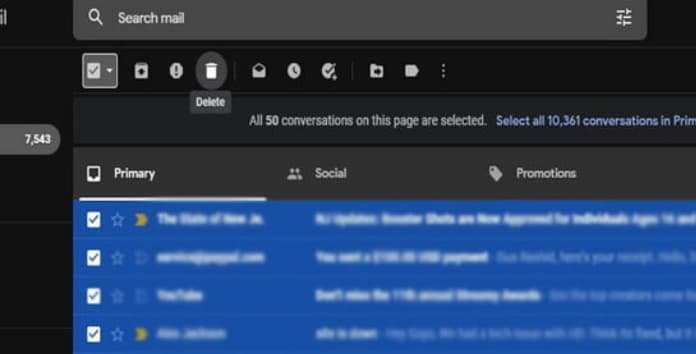
Step 3: At the top, below the search bar, on the left of the refresh button, you will see a box with a downward arrow next to it. Click on the box to select all the emails at once.
[ This will only select all email records on the current page you’re on. ]
Step 4: For mass deleting and selecting all your emails, click on the option that says “Select all conversations in ——“. You will find this option in a separate bar right under the selection box.
Step 5: Click on the “trash can” icon, situated in the same bar where the selection box and the refresh icon are situated.
How to bulk delete emails in Gmail?
How to recover deleted email records on Gmail
If you’ve deleted some of your email records you didn’t intend to, don’t worry. Deleted emails are kept in a Trash folder by Gmail, where they’re saved for 30 days before being permanently removed.
1. Log in to your Gmail account.
2. Scroll down the menu given on the left side of your screen
3. Find and click the Trash folder. [ You may need to click on More to reveal it. ]
4. Select the emails you want to restore.
5. Click the “Move to” icon ( it looks like a folder with an arrow pointing to the right)
6. Select the name of the folder you want to send the emails to.
Hope you have loved reading about “How to mass-delete all your email records on Gmail at once?”. Feel free to share this article with your friends.
Knowing how to bulk delete emails by date range in Gmail, is a fantastic way to maintain your inbox uncluttered and easily readable. It also helps to free your storage by clearing out old emails, spam, and chats you no longer require a history of.
Here are the best ways to bulk delete email records by date range in Gmail to clean out your inbox.
Steps to bulk delete emails by date range in Gmail?
Gmail is the most popular free email service provided by Google. It has multiple benefits and features that help users to manage their email records. Bulk email deletion by date is also one of the best features it has.
The option to bulk delete emails by date range enables you to choose two dates and delete all email records between that selected range. Here’re the steps to do it.
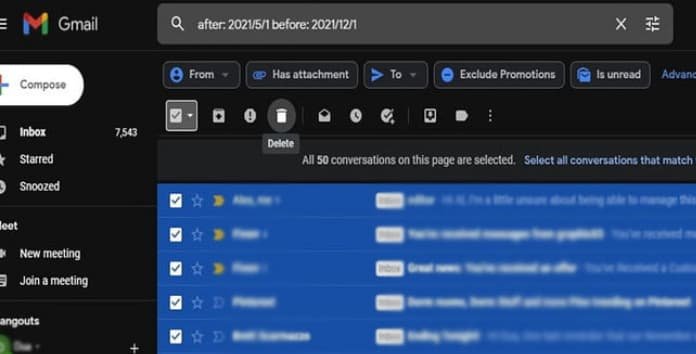
Step 1: Click on Gmail’s search box. [ You can locate that at the top of the page.
Step 2: Enter your date range. [ Use advanced search operators “before:'” and “after:” and use YYYY/M/D format for adding dates. Let’s say, you’re attempting to delete email records between June 1 and November 1, you would enter “after: 2021/6/1 before: 2021/9/1.” ]
how to bulk delete email records by date range in Gmail with special search operators
Step 3: Use the checkboxes to checkmark all the emails, and press the delete key [ or trash icon ] to delete all marked emails.
Tip: To delete more than the 50 listed on a single page, click the blank square box in a bar right under the selection box. This will “select all conversations” in that date range. And then you can delete them easily.
Hope you got “How to bulk delete emails by date range in Gmail?“, for any query feel free to leave a comment in the comment box.
Hey, this might be quite tricky for you. Because the normal solution that everyone knows is by restarting chrome. Hmm, here we are going to learn about- “How to Restart Browser Extensions Without Restarting Chrome”?
How to Restart Browser Extensions like a Pro?
If you ever had problems with extensions in Google Chrome for Windows, Mac, or Linux, forget it today. As it will be easy for you after going through this complete guide to restart the extensions independently without actually restarting Chrome itself. This simply means that you’ll keep all your open tabs. Let’s get into learning how to do it.
Sometimes extensions might slow down the chrome with a memory leak or crash and stop working. At that point, restarting the chrome extensions can temporarily remove away certain bugs. Fortunately, there’s a method to do that in Chrome Browser without closing all of your available windows and tabs.
Steps to Restart Browser Extensions Without Restarting Chrome
First, open Google Chrome.
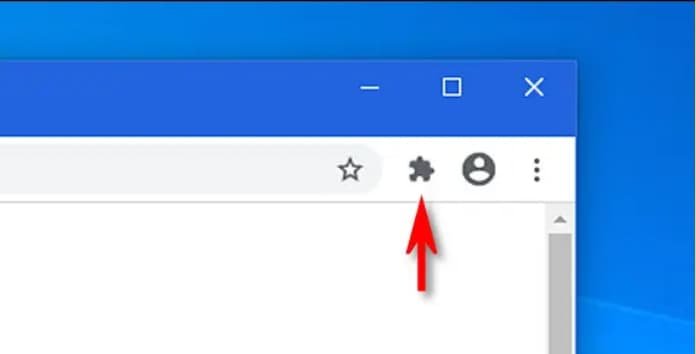
2. Click the “puzzle piece icon” in the toolbar.
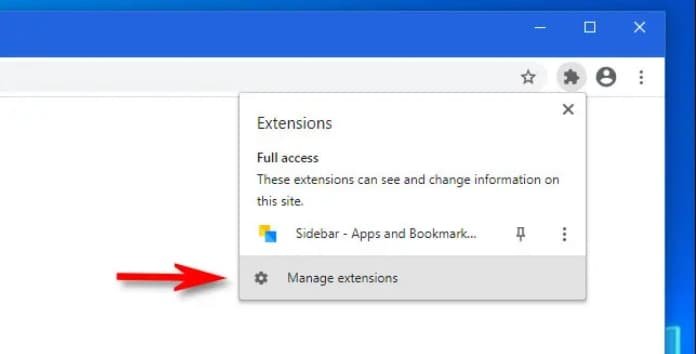
3. When the menu appears, click “Manage Extensions.”
OR Open Chrome’s menu from the three dots button, then, select and click More Tools > Extensions.
Further Steps:
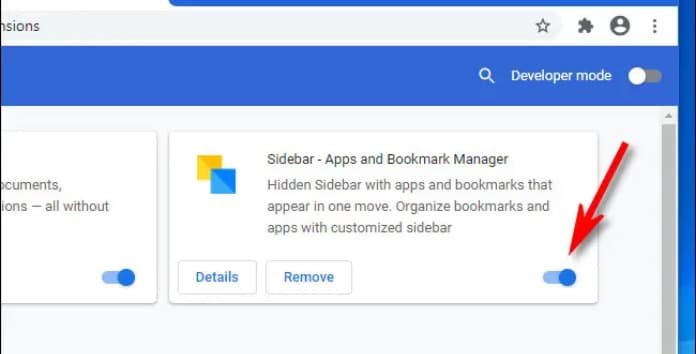
Then an “Extensions tab” will appear, each installed extension will appear there in separate boxes.
Locate the name of the culprit extension you’d like to restart
Click the switch placed beside that extension to turn it off.
Now, click the same switch you just disabled to turn it back on.
Result: The extension has been reloaded or restarted successfully and is now active again. You can repeat these steps with any other chrome extensions you have installed. Happy browsing! #staysafe #staytuned #keepreading
Do you know about the risks of using Public Wi-Fi? After reading this article you may think twice before connecting to any free network (Public Wi-Fi).
We’ve heard that we shouldn’t open PayPal, your bank account and possibly even our email inbox while using public Wi-Fi. But what are the actual risks?
Well, your home Wi-Fi network is (hopefully) encrypted—but the Wi-Fi at a shopping mall most likely isn’t. This means that you’re at risk of somebody monitoring your online activity, or more harmful—unless you know how to safeguard yourself.
Here are a few Risks of using Public Wi-Fi, and how to avoid them.
Risks of using Public Wi-Fi:
1. Browsing without Encryption is Public
Wi-Fi uses radio waves. They broadcast, and this means anyone within the range of the public wifi can notice every activity you’re accomplishing online if they know how to, with the right software.
Without protection, anyone who wants to can see:
Every website user visits
Every bit of text the user send out
User’s login information for various sites
Encryption of a wifi network is really important, as it prevents snooping by encrypting all your traffic with a private key.
At home, you can encrypt your Wi-Fi network, but Public Wi-Fi(s), on the other hand, is rarely encrypted here you don’t need to use a password in order to connect.
Does this mean you’re unable to protect yourself?
Well, no. Your other line of protection is OpenSSL, a kind of encryption offered by many trusted websites: Google, Facebook, TheFlashUpdate and most banks, to name a few.
OpenSSL encrypts the traffic between user and website, meaning no evil eye will be able to spy without permission.
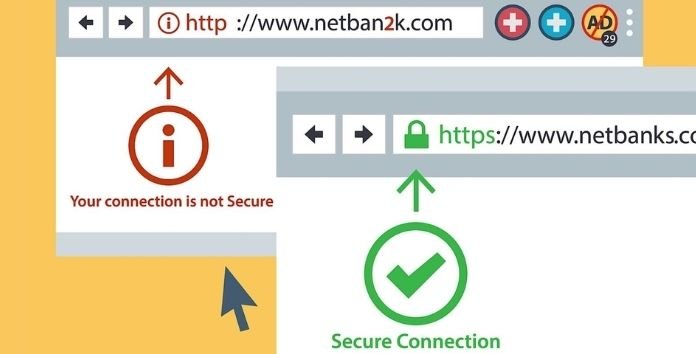
In order to check that any website has an OpenSSL or not, you can see “HTTPS” in your browser’s address bar, like this:
OpenSSL isn’t bulletproof. Additionally, you should look into using a Virtual Private Network (VPN), which makes snooping on your online activity almost impossible.
Using a VPN is the most effortless way to reduce the risks of using public Wi-Fi networks.
2. Your Fellow Wi-Fi Users May Be Infected
Obviously, snooping isn’t the only potential risk on a public Wi-Fi network: there’s also the risk of malware. When you are in a network, you are indirectly connected with other devices. Your fellow wifi users might be operating an older version of OS with tons of bugs and no malware security. Unless they are connected to any public wifi, they’re only putting themselves at risk. But when they are connected to a public Wi-Fi, any malware their computer hosts can jump over to yours.
Don’t worry we have the solution for this risk too. Both macOS and Windows machines have built-in antivirus that keeps you safe from incoming malicious files. You just have to take care of your device’s settings. In Windows, you have to set all public Wi-Fi networks as “Public” in your security settings, so the OS knows not to trust them. You can also use third-party firewalls!
3. The FREE Wi-Fi Network May Be a Trap
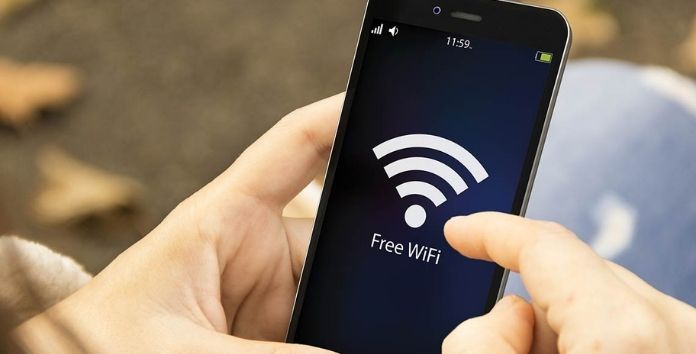
Scammers use fake public Wi-Fi networks in the hopes they can steal personal information. If you connect to a network, like “Free Wi-Fi For you”, without password protection and a welcome screen, it might be a trap.
Connecting to such networks wouldn’t be any different from genuine wifi networks. You’ll be able to browse the websites as usual. But in actuality, you’re falling for a phishing scheme.
You won’t be able to identify, a fake version of the site you think you’re visiting, but you could be entering your email username and password into that fake site, giving your password to a scammer in the process.
OpenSSL can’t protect you in such cases—everything will appear to be working as usual.
How can you defend yourself from such networks?
The best way is to connect to only those Wi-Fi networks, you know who’s running them. Ask business owners about the name of their network, just to ensure you’re joining a legitimate network.
But even this isn’t enough. It’s possible for a network to be hijacked or replaced. That’s why it’s important to use a trusted VPN provider and reliable anti-malware on your device.
Think Ahead When Connecting to Free Public Wi-Fi
Keep these points in mind, if you wanna stay safe:
Unencrypted traffic can be listened in by anyone.
Make sure your firewall is active, and you have updated malware protection.
Consider using public Wi-Fi only via an encrypted VPN service.
Hope you keep these points in your mind, actually, this is crucial for your device and personal information security. #staysafe #staytuned #keepreading
Tesla is making strenuous efforts to get its electric vehicles to Indian shores. The company has been openly attempting to make the case for their automobiles. Elon Musk, the company’s CEO, has been pleading with the Indian government to decrease the customs levy on electric vehicles. However, the Indian government seems to be sticking to its decision to favour domestic manufacturing. A recent report indicates that the stalemate between the two parties may go longer.
According to Reuters, many persons close to the report have been engaged in the conversations with Tesla. According to insiders, the government is not persuaded by Tesla’s ambition to begin manufacturing in India. According to the source, the government is requiring a strong commitment and a well-defined strategy for investing in India.
The report cited one individual with firsthand knowledge of these exchanges. According to the insider, the Indian government and Tesla have reached a “strange stalemate.” Additionally, the individual indicated that things are not progressing in the manner Tesla desires.
According to another source, Tesla is also open to obtaining more car components locally and then gradually transitioning to manufacturing its products. This, however, is insufficient for the Indian government, which requires a formal promise prior to the company entering India.
The report also quotes a top government official. The official said that a tariff reduction on Tesla automobiles is quite improbable. “How is that model going to function if they are not willing to invest anything here,” the official questioned.
What becomes of Indian purchasers?
With this new knowledge in hand, it’s reasonable to infer that Tesla’s India debut will be pushed back further. Initially, the company intends to import the automobiles in fully assembled form (CBU). However, when compared to the cost in the United States, the hefty import tariff might almost double the price of the automobile.
Tesla expects that the majority of purchasers will baulk at that price. The stalemate between the two sides has lasted an extended amount of time. Tesla may soon be forced to choose between a full-fledged entry into India and a wait-and-see decision.
Hello, friends, The biggest and the most powerful space telescope in the world was launched by NASA some days ago. It’s named the James Webb Space Telescope.
Using this, you can time travel of sorts. I mean, it isn’t possible to go back in time, but with this, you can get a glimpse of history. And I’m not talking about the history made in the last 5-6 years, literally, millions and billions of years’ history can be looked at using this telescope.
More specifically, 13 Billion Years!!!
The universe began with the Big Bang 13.8 billion years ago. And this telescope can look till 13 billion years ago. About 0.8 billion years after the universe began.
But how can it be possible? Let’s understand this phenomenon…
James Webb Space Telescope
The most special thing about this telescope is that, it has been designed mainly to detect infrared light.
When you look at the sky, with a normal telescope, you see the wavelengths of visible lights. The light that you can see with your naked eye.
Do you remember studying about Electromagnetic Spectrum in school? The Electromagnetic waves in a broad spectrum includes X-rays, Ultraviolet rays, radio waves, microwaves, and in there, there is a small range of visible light.
The normal telescopes that you can buy at any shop, help you look only at the wavelength of the visible light.
The range of visible light is between blue colour to red colour, and red has the biggest wavelength.
And as you know, with electromagnetic waves, the bigger the wavelength, the easier it is for the electromagnetic waves to pass through any object or obstacle.
Like the radio waves. The radio that you listen to. The wavelengths of radio waves may span more than kilometres.
For this reason, you can listen to the radio waves that pass through buildings even.
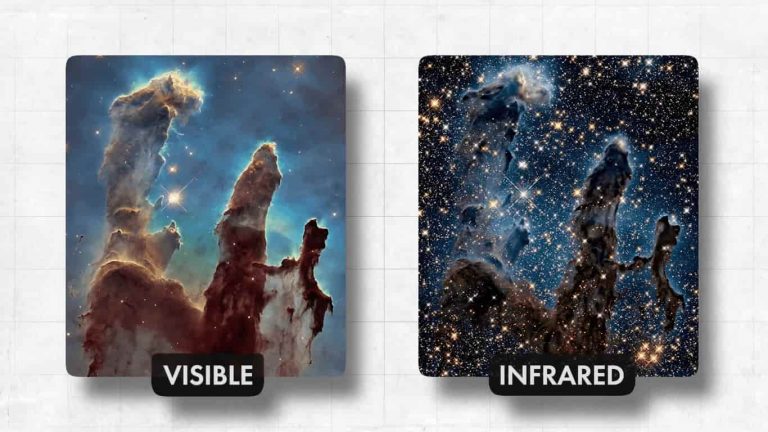
The wavelengths of infrared are bigger than that of red. But we can’t see infrared with our naked eyes. The advantage of using a telescope for looking at infrared, can be seen in this photo.
Photo by Hubble Space Telescope
The photo on the left was taken by the Hubble Space Telescope. The most powerful space telescope we had till now. You can see the space dust in it. And you can see the clouds of gases forming.
But infrared wavelength can pass through the dust and clouds and we’ll be able to see what lies behind this.
The picture on the right is what we imagine we would be able to see with the James Webb Space Telescope.
Basically, you can say that we’ll get a more high-quality, HD picture.
Hubble Space Telescope / VS / James Webb Space Telescope
The word Infrared basically means below red. This word comes from Latin, “Infra” means “below”. So Infrared literally means Below Red. Because its frequency lies below that of red. And frequency is inversely proportional to wavelength.
Anything that radiates heat, emits infrared waves. Humans, animals, the Sun, fire each of these emits infrared waves. That’s why in night goggles, you would’ve seen soldiers use night goggles often, they basically detect infrared.
Through the night vision goggles, you get a view like this.
night vision
It is captured by infrared cameras.
Since the telescope will look at stars and galaxies of stars, and planets, all of which radiate heat, it’ll be possible to capture and look at the infrared waves.
The other advantage of infrared is that when a telescope looks at stars at such a distance, stars that are billions of kilometres far from us, when the light from those stars reaches the telescope, the light has travelled such a distance, that by the time it reaches here, and as we know the universe is slowly expanding, the wavelength of the light gets stretched. The wavelength gets elongated. This phenomenon is known as the Red Shift. That the wavelength of the light has stretched a bit, and has shifted towards the colour red.
With telescopes, the bigger the mirror they are equipped with, the more light they’d be able to capture. And the resolution of the image that we get will be that much higher. That’s why, with the creation of more and more advanced telescopes, they are being equipped with bigger mirrors.
The mirror of the Hubble Space Telescope, was of this size.
Hubble Vs JWST Primary Mirror
And you have the mirror of the James Webb Space Telescope beside it.
This entire mirror is plated with 24karat gold. Because gold is the best at reflecting red light. Because of gold, the reflectiveness of this mirror is at 98%.
There’s a problem here…
I said that everything that radiates heat emits infrared waves. When the telescope will start working, the telescope will radiate some heat too. Some infrared waves will be emitted from within the telescope. It’ll interfere with the waves coming from the galaxies and we wouldn’t be able to get good high-quality pictures.
To avoid this, this James Webb Space Telescope will work only at the cold temperatures of -223°C. The temperature needs to be so low for it to work.
On Earth, the temperature hasn’t fallen below -89°C. So how could this telescope be kept so cold? It is possible to do it in space. It is possible because it is very cold in space, unless there’s sunlight. If sunlight falls on you in the space, the temperature would rise rapidly.
As is the case on the moon. Because there isn’t any atmosphere on the moon, the temperature may fall to -170°C there. But as soon as there’s sun, the temperature rises to 120°C. It is very problematic for this telescope. No sooner would sunlight fall on this telescope it would be problematic as everything would heat up rapidly.
So they needed to stop the Sun. To avoid this problem, a Sun Shield has been installed on this James Webb Space Telescope.
Sun Shield – James Webb Space Telescope
This Sun shield is in the shape of a kite and is as big as a tennis court. So the telescope could remain protected from the Sun. For this, a very special material has been used, Kapton.
This Sun Shield comes with 5 layers of Kapton, and each layer is thinner than a strand of human hair. There’s a vacuum gap between each layer. So that its effectiveness could be increased. Apart from this, each layer has an aluminium coating on it. And the two layers closest to the Sun have a coating of doped-silicon.
Deployment of James Webb Space Telescope
This space telescope isn’t being deployed near the Earth, as the Hubble Space Telescope was. Hubble is close to the Earth and orbits around it. But this will be deployed 1.5 million kilometres away from the Earth. At the point known as the L2 point.
L stands for Lagrange Point. This point will be on the other side of the Sun, because obviously, it is important to block the heat and light of the Sun as much as possible for the better functioning of this telescope. And the L2 Point is special because, it keeps revolving with the Earth. So the Sun will be hidden throughout the revolution.
Look at how its orbit will be.
L2 Point
The Earth’s shadow will keep the Sun hidden.
It’s similar to when you look at something in the direction of the Sun, you can’t see clearly because of the sunlight. It’s the same as when you cover the Sun with your hand. And you get to see clearer. It’s the same with the telescope.
Complicated Procedure – James Webb Space Telescope
NASA has said that the entire procedure of creating and launching it is so complicated that they have identified more than 300 potential problems that may arise.
More than 300 single points of failures, if any of them come true, then the entire project would be as good as over. $10 Billion has been spent on this project. This amount is so huge that NASA had to defund several research projects and direct the money to this project to make it possible.
Along with NASA, the European Space Agency and the Canadian Space Agency are also participating in this.
The scientists have pinned their hopes that using this, they would be able to study how did stars and galaxies form after the Big Bang. As I told you, with this telescope, you can look 13 billion years into the past.
The Hubble Space Telescope could look to only 1 billion years after the Big Bang took place. So about 12.8 billion years ago. But the James Webb Space Telescope can look to 0.3 billion years after the Big Bang.
As you can see in this diagram. When the stars began to form first…
Age of the Universe – Traverse of Light
How is it possible to look into the past?
You’d ask how is it possible to look into the past? The answer to it is very simple. The light takes some time to travel the distance. And by the time the light reaches from one place to the other, a lot of time would have passed. Especially when it involves distances this large.
The light from the Sun reaches the Earth by travelling approximately 8 minutes. For example, It means that if the Sun vanished suddenly, it will take 8 minutes for people to find out on Earth, to see that the Sun has disappeared. In a way, you can say that we are looking 8 minutes into the past when we see the Sun.
Similarly, apply this logic on a large scale. The stars and galaxies that are millions of light-years away from us, when we look at them through the telescope or we gaze at the stars from the Earth, we are actually seeing them as they were millions of light-years ago.
The universe is so huge that there are stars that are 13 billion lightyears away from us, by the time their light reaches Earth, 13 billion years would have elapsed, and what we get to see today, are the events of 13 billion years ago.
This way we can get a glimpse of history. With this logic, theoretically, it is also possible that if we go 100 million lightyears away from the Earth, we teleport to a planet that is 100 million lightyears away from the Earth. And on that planet, we build a very powerful telescope and look at the Earth, we’ll get to see the Earth as it was 100 million years ago. We’ll get to see dinosaurs!
But the practical problem to doing this is that by the time we go to the other planet and look back at the Earth, it will take a much longer time to reach the other planet, than the years that we can look back to.
So if it becomes possible to travel by teleporting, we’ll be able to watch history occurring on the Earth. And would actually be able to time travel.
Interesting result Expected
Additionally, it will be also interesting to see the new planets that the James Webb Telescope discovers. Can it find a planet with Earth-like conditions? Where life can be possibly found. Time will tell…
Many fraudsters use WhatsApp to commit fraud. It has just been detected a new modus operandi in which the fraudsters send texts [“I’m sorry, who are you?”] and earn the trust of the victim. A New WhatsApp Fraud…
Info about A New WhatsApp Fraud…
It all begins from a message saying something like: “Sorry, who are you? I found you in my address book. ”
With that justification, they initiate the chat in which they try to be pleasant. And after a long chat, the crook asked to be added to your personal social account.
Once they have been added to any of your personal social media networks they will attempt to get more info about you. Such as places where you have been or your list of friends.
After knowing enough about you, from there they will move to the next phase which is blackmailing you for money. They will say that they have some of your confidential pictures with friends or family, and if you don’t give them money, they will share them everywhere.
Even if you make a deposit to them, they will always keep asking for money in endless blackmail.
The only way to stay safe is, ignore such messages from unknown numbers who are pushing pleasant messages to you to get your information.
You can always report such contact numbers to WhatsApp so that they can block such activities by blocking the number. Also, you must configure the privacy of your profile picture.
If something goes wrong, The best option is to immediately report to the police – the officers may be able to locate the fraudsters from their phone number.
Stay tuned for future updates regarding New WhatsApp Fraud (s).
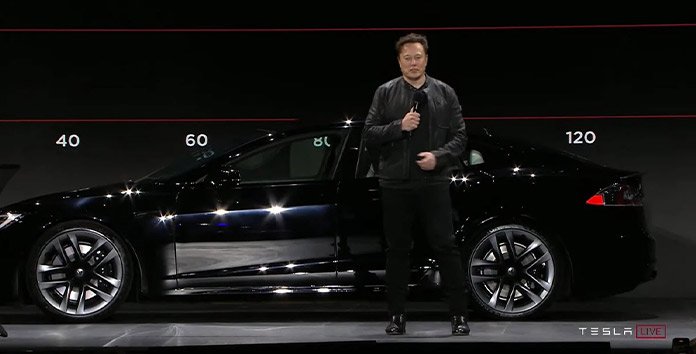
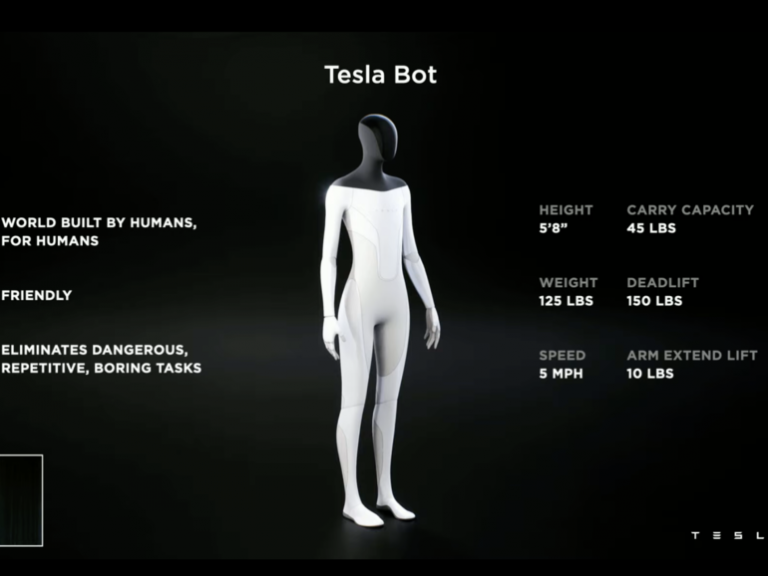
Elon Musk took to the stage earlier this year to present something that many would say is more impressive than the Tesla Cybertruck. The CEO unveiled the Tesla Bot and then conducted a comprehensive presentation and follow-up Q&A with his product development team.
During the August launch, it seemed as if the business was only dipping its toes into the robot ecosystem to gauge interest. Musk said that although it is not as critical as developing renewable energy technology, it is on their radar and they have already begun the recruiting process for developing the Tesla Bot.
“I believe the possibilities are limitless,” Musk said. While this is not directly related to Tesla’s core purpose of expediting the world’s transition to sustainable energy, it is a very beneficial development for the world to create a humanoid robot capable of interacting with the environment and assisting in a variety of ways.”
Tesla CEO Elon Musk suggested in a recent interview with Lex Fridman that the Tesla Bot may be more than a machine. In the interview, he discussed how the company’s robot, which resembles something from a science fiction film, has the potential to become a human partner. He even said they may evolve into humanoids similar to R2D2 or C3Po from the Star Wars saga.
He said that the Bot “may acquire a distinct personality over time.” It’s not as though all robots are identical. That personality, or whatever you want to name it, might grow to fit the owner.”
This is a strong remark from the business magnate, since he has explicitly dismissed the idea that we need Artificial Intelligence (AI) to advance technology. He argues that the majority of what AI accomplishes can be accomplished without it. It will be fascinating to watch how something like a Tesla Bot would be able to operate as a buddy while still retaining some degree of uniqueness without or with little usage of AI.
Musk has already made a strong declaration in support of robots. He said that Tesla might easily be seen as a robotics firm rather than a car manufacturer. The allegation was backed by the company’s usage of self-driving technology, which effectively transforms its vehicles into robots on wheels.
He has often said that the Tesla Bot’s primary purpose will be to relieve people of repetitive activities that might cause stress. He also mentioned the issue of future labour shortages during the presentation for Tesla Bot, which may be addressed by robots like Tesla Bot.
Is Tesla Bot for real?
Tesla is developing Musk’s robot. The Tesla Bot design is for a sleek, 125-pound humanoid robot that will use Tesla’s vehicle artificial intelligence and autopilot capabilities to plan and follow routes, handle traffic—in this case, pedestrian crossings avoid hazards.
What is the Tesla Bot supposed to do?
Tesla stated that it is developing a humanoid robot named Tesla Bot that will be capable of assisting you with grocery shopping and other boring tasks.
What is the name of the Tesla Bot?
Tesla’s “total self” technology, which name is Autopilot, serves as a jumping-off point for the Tesla Bot’s developers.
What is the cheapest Tesla?
The Tesla Model 3 is not a cheap vehicle. Tesla previously bragged boldly of a $35,000 all-electric vehicle. Tesla’s entry-level vehicle is now the standard-range Model 3, which begins at $43,990.
We use cookies on our website to give you the most relevant experience by remembering your preferences and repeat visits. By clicking “Accept”, you consent to the use of ALL the cookies.
This website uses cookies to improve your experience while you navigate through the website. Out of these, the cookies that are categorized as necessary are stored on your browser as they are essential for the working of basic functionalities of the website. We also use third-party cookies that help us analyze and understand how you use this website. These cookies will be stored in your browser only with your consent. You also have the option to opt-out of these cookies. But opting out of some of these cookies may affect your browsing experience.
Necessary cookies are absolutely essential for the website to function properly. This category only includes cookies that ensures basic functionalities and security features of the website. These cookies do not store any personal information.
Any cookies that may not be particularly necessary for the website to function and is used specifically to collect user personal data via analytics, ads, other embedded contents are termed as non-necessary cookies. It is mandatory to procure user consent prior to running these cookies on your website.